Report 2 — Mid-Point Technical Proof
This report documents the transition from system design to implementation for the project. It provides the formal technical structure for Milestone 2 while reserving all project-specific results, measurements, and evidence for later completion.
Table of Contents
- Table of Contents
- 1. Kinematics
- 2. System Architecture
- 2.1 Mermaid Diagram
- 2.1.1 Data Flow Diagram (Perception → Estimation → Planning → Actuation)
- 2.1.2 rqt_graph Export
- 2.2 Module Descriptions
- 2.2.1 Module Declaration Table
- 2.2.2 Custom Node Logic Flow
- cylinder_finder
- box_finder
- pose_estimator
- confidence_evaluator
- nbv_planner
- orchestrator
- navigation subsystem
- visual_odometry (ORB-SLAM 3)
- ekf_fusion (Extended Kalman Filter)
- custom interfaces
- 2.2.3 Library Node Configuration
- 3. Experimental Analysis & Validation
- 4. Project Management
1. Kinematics
The kinematics model governs how the robot’s state (position and orientation) evolves over time in response to control commands. It provides the mathematical foundation for motion planning and state estimation, connecting what we command (velocity inputs) to what actually happens (pose updates).
1.1 Robot Motion Model
The robot state is represented in the odometry frame (odom) with the state vector:
where (x, y) is the robot’s position in the global frame and θ is its orientation (yaw angle). The continuous-time differential drive kinematics are:
\[\begin{aligned} \dot{x} &= v \cos(\theta) \\ \dot{y} &= v \sin(\theta) \\ \dot{\theta} &= \omega \end{aligned}\]The state variables represent the robot’s 2D pose in the planning frame. The model is appropriate for a differential drive platform, where forward motion is coupled with rotation through the control inputs.
1.2 Control Inputs
Specify the control inputs used by the robot and how they correspond to commanded motion.
\[\mathbf{u} = [v,\ \omega]^\top\]where v is the commanded linear velocity (m/s) and ω is the commanded angular velocity (rad/s).
The implementation uses linear and angular velocity commands via the ROS 2 geometry_msgs/Twist interface streamed to the differential drive controller.
1.3 State Update Equations
The discrete-time state updates using first-order Euler integration with time step Δt are:
\[\begin{aligned} x_{k+1} &= x_k + v_k \cos(\theta_k) \Delta t \\ y_{k+1} &= y_k + v_k \sin(\theta_k) \Delta t \\ \theta_{k+1} &= \theta_k + \omega_k \Delta t \end{aligned}\]The discrete updates are derived from Euler integration of the continuous kinematics model. The time step Δt corresponds to the control execution rate of the differential drive controller and the EKF fusion update.
2. System Architecture
This section describes the functional modules that compose the active perception pipeline. Each module is responsible for a specific stage of object detection, pose estimation, viewpoint planning, and navigation. The system is organized as a ROS 2 network where perception nodes stream observations, decision modules operate on demand, and an orchestrator manages the active perception loop.
2.1 Mermaid Diagram
2.1.1 Data Flow Diagram (Perception → Estimation → Planning → Actuation)
flowchart LR

  subgraph Perception
    RGBD[RGBD Camera]
    LIDAR[LiDAR]
    IMU[IMU]
  end

  subgraph ObjectPerception
    PCP[Point Cloud]
    OPE[Object Pose]
  end

  subgraph RobotLocalization
    VO[Visual Odometry]
    EKF[EKF]
  end
  subgraph Planning
    CONF[Confidence Evaluation]
    NBV[Next Best View]
    NAV2[Nav2 Global Planner]
    RC[Reactive Controller]
  end

  subgraph Actuation
    DDC[Diff Drive Controller]
    MHI[Motor Hardware Interface]
  end

  %% Perception → Object perception
  RGBD --> PCP
  PCP --> OPE

  %% Perception → Localization
  RGBD --> VO
  IMU --> EKF
  VO --> EKF


  %% Estimation to planning
  OPE --> CONF
  CONF --> NBV
  EKF --> NAV2

  %% Planning to actuation
  NBV --> NAV2
  NAV2 --> RC
  LIDAR --> RC
  RC --> DDC
  DDC --> MHI

  %% Styles
  style Perception fill:#ffe6e6,stroke:#333,stroke-width:2px
  style ObjectPerception fill:#fff2cc,stroke:#333,stroke-width:2px
  style RobotLocalization fill:#fff2cc,stroke:#333,stroke-width:2px
  style Planning fill:#e6e6ff,stroke:#333,stroke-width:2px
  style Actuation fill:#d9f2d9,stroke:#333,stroke-width:2px
2.1.2 rqt_graph Export
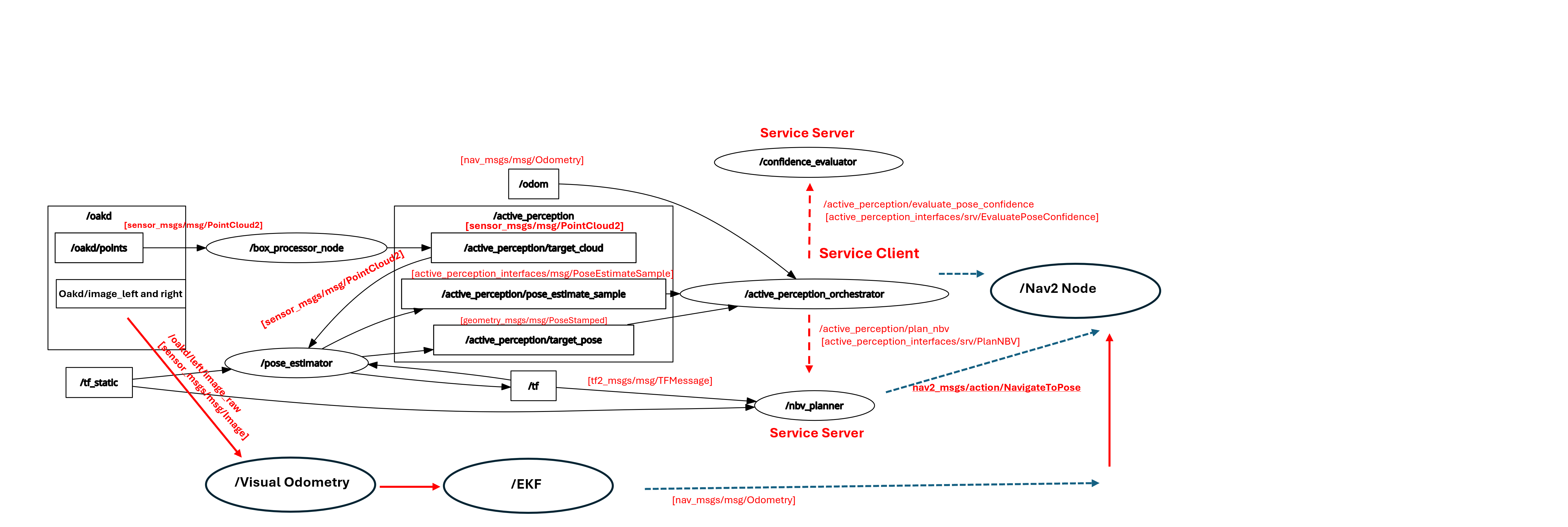
Figure 2.1. Annotated ROS 2 computational graph for the active perception pipeline. Solid black arrows denote implemented topic connections labeled as /topic_name [msg_type]. Dashed red arrows denote implemented service calls labeled as /name [srv_type], while dashed blue arrows denote planned Nav2 action integration labeled as /name [action_type]. The graph illustrates the flow from perception through pose estimation and orchestration to next-best-view planning and navigation.
Explanation: Figure 2.1 provides a runtime view of the ROS 2 system, complementing the conceptual architecture shown in the Mermaid diagram. The figure highlights the distinction between streaming perception topics and service-based decision modules.
The perception nodes detect the target object (box or cylinder) using point cloud processing techniques introduced in class. The object pose (x, y, yaw) is estimated using PCA and then transformed into the odom frame by the pose estimator node. These pose estimates are continuously streamed and consumed by the orchestrator node.
The orchestrator aggregates a short history of pose estimates and calls the confidence_evaluator service to compute a confidence score and determine whether an additional viewpoint is required. If the confidence exceeds the desired threshold, the process terminates. Otherwise, the orchestrator calls the nbv_planner service, which computes the next best view in the odom frame.
The resulting goal is passed to the Nav2 stack, which plans and executes a collision-free trajectory using state feedback from visual odometry fused with an EKF. This active perception loop continues until the confidence level exceeds the predefined threshold.
Custom message and service interfaces are used to facilitate structured data exchange between modules and will be described in the following section.
2.2 Module Descriptions
This section provides a detailed explanation on Modules and their logic.
2.2.1 Module Declaration Table
| Module Type | Nodes | Inputs and Outputs | Key Parameters | Source | Status |
|---|---|---|---|---|---|
| Perception | cylinder_finder, box_finder, pose_estimator | Input: /oakd/points [sensor_msgs/msg/PointCloud2], /active_perception/target_cloud [sensor_msgs/msg/PointCloud2], /tf, /tf_static Output: /active_perception/target_cloud [sensor_msgs/msg/PointCloud2], /active_perception/target_pose [geometry_msgs/msg/PoseStamped], /active_perception/pose_estimate_sample [active_perception_interfaces/msg/PoseEstimateSample], viz/detections [visualization_msgs/msg/MarkerArray], target markers | Segmentation thresholds, clustering limits, fitting tolerances, target_frame, PCA anisotropy threshold, minimum point count | cylinder_finder.py, box_finder.py, pose_estimator.py | Implemented |
| Estimation (VO) | visual_odometry_node (ORB-SLAM 3) | Input: /oakd/left/image_raw [sensor_msgs/msg/Image], /oakd/right/image_raw [sensor_msgs/msg/Image], /oakd/left/camera_info [sensor_msgs/msg/CameraInfo], /oakd/right/camera_info [sensor_msgs/msg/CameraInfo], /tf, /tf_static Output: /vo/pose [geometry_msgs/msg/PoseStamped], /vo/odometry [nav_msgs/msg/Odometry] | ORBvoc.txt, stereo YAML (fx, fy, cx, cy, baseline), sync_slop, max_sync_delta_ms, startup VO->odom alignment | ORB_EKF/orb_ekf/orb_vo_node.py, ORB_EKF/config/orb_vo.yaml | Implemented |
| Localization / Fusion (EKF) | ekf_node (robot_localization) | Input: /odom [nav_msgs/msg/Odometry], /vo/odometry [nav_msgs/msg/Odometry], /tf Output: /fused_odom [nav_msgs/msg/Odometry], /odometry/filtered [nav_msgs/msg/Odometry], /tf (odom to base_link) | two_d_mode, frequency, sensor_timeout, odom0/odom1_config, process and measurement covariance tuning | ORB_EKF/config/ekf.yaml, ROS 2 robot_localization | Implemented (not tested) |
| Planning | confidence_evaluator | Input: /active_perception/evaluate_pose_confidence [active_perception_interfaces/srv/EvaluatePoseConfidence] Output: confidence score, stop flag, NBV flag, diagnostic metrics | Stability weights, variance normalization terms, confidence threshold, recency weighting | confidence_evaluator.py | Implemented |
| Planning | nbv_planner | Input: /active_perception/plan_nbv [active_perception_interfaces/srv/PlanNBV], /tf Output: next best view in odom, /active_perception/nbv_markers [visualization_msgs/msg/MarkerArray] | planning_frame, candidate count, radius bounds, utility weights | nbv_planner.py | Implemented |
| Planning / coordination | orchestrator | Input: /active_perception/target_pose [geometry_msgs/msg/PoseStamped], /active_perception/pose_estimate_sample [active_perception_interfaces/msg/PoseEstimateSample], /odom [nav_msgs/msg/Odometry] Output: service calls to confidence evaluation and NBV planning, planned Nav2 goal handoff | history_size, desired confidence threshold, minimum history length, NBV radius and candidate settings | orchestrator.py | Implemented, Nav2 integration pending |
| Custom interfaces | PoseEstimateSample.msg, EvaluatePoseConfidence.srv, PlanNBV.srv | Defines the message and service contracts between perception, orchestration, confidence evaluation, and NBV planning | Interface field definitions | active_perception_interfaces | Implemented |
| Navigation | Nav2 stack, nav_goal_sender, safety_monitor | Input: planned next-best-view goal in odom, /scan [sensor_msgs/msg/LaserScan], /odom [nav_msgs/msg/Odometry], optional bumper/cliff status Output: NavigateToPose action goal, navigation status, safe stop / cancel behavior | Goal frame, planner settings, controller settings, timeout threshold, minimum stopping distance, sensor freshness bounds | External ROS 2 package + planned custom ROS 2 nodes | Partially implemented, integration in progress |
2.2.2 Custom Node Logic Flow
The active perception system is organized as a staged ROS 2 pipeline in which perception nodes stream observations continuously, while confidence evaluation and next-best-view selection are triggered on demand by the orchestrator. This separation keeps high-rate sensing and lower-rate decision making decoupled, which simplifies both debugging and future integration with navigation.
cylinder_finder
The cylinder_finder node performs geometry-specific perception for cylindrical targets. Starting from the incoming RGB-D point cloud, the node applies workspace filtering, downsampling, floor removal, local clustering, and cylinder fitting. Candidate clusters are evaluated using geometric consistency and inlier support, after which the strongest detection is selected and published as /active_perception/target_cloud.
Within the complete system, this node acts as a front-end detector for one object class. Its purpose is not to estimate the final object pose directly, but rather to isolate a reliable target point cloud that can be passed to the pose estimation stage. This design allows the finder to remain object-specific while the downstream pose estimator remains reusable across multiple target types.
box_finder
The box_finder node plays the same architectural role as the cylinder_finder, but is specialized for box-shaped objects. It processes the incoming point cloud through spatial filtering, floor segmentation, and Euclidean clustering to isolate candidate object clusters. For each cluster, it then applies a PCA-based oriented bounding box fitting method: the cluster covariance is analyzed to extract principal axes, one axis is constrained to align with the expected vertical direction, and the cluster is projected into this local frame to estimate box center, orientation, and dimensions. Simple geometric checks on size and aspect ratios are then used to reject implausible candidates. The selected target cluster is published to the shared topic /active_perception/target_cloud.
pose_estimator
The pose_estimator node receives the segmented target cloud and converts it into a compact pose representation suitable for planning. The incoming point cloud is first transformed from the camera optical frame into the planning frame, odom, using TF. Pose estimation is then performed in that common frame by computing the object centroid and using PCA to infer a stable planar orientation.
The node publishes both /active_perception/target_pose and /active_perception/pose_estimate_sample. The first provides a direct pose output for downstream consumers, while the second packages additional metadata such as point count, anisotropy ratio, and yaw source. These extra fields are important because the downstream confidence evaluator reasons not only over pose values, but also over the quality and consistency of each estimate.
confidence_evaluator
The confidence_evaluator node is implemented as a service rather than a streaming subscriber. This is a deliberate design choice: confidence should be evaluated only after the orchestrator has accumulated a short history of recent pose estimates. The confidence_evaluator node assesses whether the current object pose estimate is reliable enough to terminate the active perception loop. Rather than evaluating a single estimate, it scores a recent history of PoseEstimateSample observations using weighted measures of positional stability, yaw stability, average point count, anisotropy of the observed cloud, and the fraction of estimates whose yaw was derived from PCA rather than fallback centroid bearing. The resulting confidence score is compared against a user-defined threshold and minimum history length to determine whether the system should stop or continue planning a next-best view.
nbv_planner
The nbv_planner selects the next-best-view using a discrete candidate evaluation strategy. Given the current target pose and robot pose in the planning frame, it samples N candidate viewpoints uniformly on a circle around the object:
with each candidate yaw chosen to face the target:
\[\theta_i = \operatorname{atan2}(y_t - y_i,\; x_t - x_i).\]Each candidate is scored using the weighted cost
\[J^{(i)} = w_r C_r^{(i)} + w_d C_d^{(i)} + w_h C_h^{(i)},\]where
\[\begin{aligned} C_r^{(i)} &= \frac{|r - r_d|}{\max(r_d,\varepsilon)}, \\ C_d^{(i)} &= \frac{\|\mathbf{p}_i - \mathbf{p}_r\|}{\max(r_{\max},\varepsilon)}, \\ C_h^{(i)} &= \frac{|\operatorname{wrap}(\theta_i - \theta_r)|}{\pi}. \end{aligned}\]The selected next-best-view is the sampled candidate with minimum cost:
\[i^* = \arg\min_i J^{(i)}.\]Therefore, the planner does not solve a continuous optimization problem; it samples a finite set of candidate viewpoints, scores them, and returns the lowest-cost one.
orchestrator
The orchestrator is the coordination layer for the active perception loop. It subscribes to the streaming pose outputs from the pose estimator and stores a bounded history of recent pose samples. With at least one sample, it calls the confidence_evaluator service. If confidence is sufficiently high, the loop terminates. Otherwise, it calls the nbv_planner service to request a new goal in odom.
In detail, the orchestrator uses a state-machine approach, and defines the following states: IDLE, WAITING_FOR_POSE, EVALUATING, PLANNING_NBV, READY_TO_NAVIGATE, DONE. Each new sample is appended to this history and, provided the system is not already evaluating or planning, triggers a confidence-evaluation service request. The request contains the full current history window along with the desired confidence threshold and minimum history length. If the returned confidence response indicates that estimation is sufficiently reliable, the orchestrator transitions to a terminal DONE state. Otherwise, it constructs and sends a next-best-view planning request using the latest target pose and robot pose. The NBV response is then stored as the next candidate navigation goal, and the orchestrator transitions to a READY_TO_NAVIGATE state. In the current implementation, the actual Nav2 call is marked as a TODO, so the orchestration logic ends at NBV selection rather than full closed-loop execution.
navigation subsystem
The navigation in this project is the subsystem that converts a selected next-best-view into safe physical robot motion on the TurtleBot4. Rather than implementing a custom planner from scratch, the design uses the ROS 2 Nav2 stack for global planning, local obstacle avoidance, and trajectory execution, while the custom navigation logic acts as the bridge between perception uncertainty and autonomous motion.
At the system level, this navigation role has four responsibilities: receive the next viewpoint as goal, convert it into a valid robot goal pose, dispatch that goal through the nav2_msgs/action/NavigateToPose interface, and monitor execution until success, failure, or interruption is reported back to the orchestrator. In this sense, navigation is not teleoperation or low-level wheel control; it is the viewpoint-to-viewpoint autonomy layer of the active perception loop.
For the TurtleBot4, the navigation model follows planar differential-drive motion, so the same state and control definitions introduced in Section 1 apply directly to viewpoint execution:
\[\mathbf{x} = \begin{bmatrix} x \\ y \\ \theta \end{bmatrix}, \qquad \mathbf{u} = \begin{bmatrix} v \\ \omega \end{bmatrix}.\]The role of navigation is therefore to take a desired viewpoint pose in odom or map, plan a collision-free route through Nav2, and drive the robot until the final pose lies within an acceptable observation tolerance for the perception subsystem.
The proposed custom nodes for this subsystem are nav_goal_sender and safety_monitor. The nav_goal_sender packages the output of the orchestrator or NBV planner as a NavigateToPose action goal and tracks progress feedback from Nav2. The safety_monitor supervises stale /scan or /odom data, execution timeout, and emergency stop conditions, and can cancel the current navigation goal or force a safe stop if the platform state becomes unsafe.
Operationally, the navigation workflow is:
- Perception estimates the object pose.
- Confidence evaluation decides whether another observation is needed.
- If needed, the NBV planner selects a new viewpoint around the object.
- The orchestrator forwards that viewpoint to the navigation layer.
- The navigation layer sends the goal to Nav2 using
NavigateToPose. - Nav2 plans and executes a collision-free trajectory while reacting to obstacles.
- Once the robot reaches the viewpoint, the active perception loop resumes observation.
This contribution defines navigation as the execution bridge in the loop
\[\text{observe} \rightarrow \text{evaluate} \rightarrow \text{choose viewpoint} \rightarrow \text{navigate} \rightarrow \text{observe again}.\]From a safety standpoint, the navigation design includes deadman timeout behavior, safe-stop handling for stale localization or LiDAR data, and cancellation of active goals when localization confidence drops or a minimum stopping distance is violated. This is especially important because the quality of object localization depends not only on perception accuracy, but also on whether the robot can reach stable and valid viewpoints without unsafe motion.
visual_odometry (ORB-SLAM 3)
The visual_odometry node implements ORB-SLAM 3 for real-time camera-based localization and TurtleBot 4 motion estimation using a Python wrapper. The node subscribes to stereo monochrome raw images from the OAK-D left and right cameras (/oakd/left/image_raw and /oakd/right/image_raw) and computes the camera pose and sparse 3D map incrementally as the robot moves.
ORB-SLAM 3 tracks visual features (ORB keypoints) across consecutive stereo frames and estimates camera motion through feature matching, stereo triangulation, and bundle adjustment. The output is the camera pose (position and orientation) estimated in the camera frame and then transformed to the robot frame using TF, published at the incoming camera rate (subject to compute and sensor latency).
The node publishes the current robot pose as a local visual-odometry estimate. The trajectory is relative to the initial startup pose, so accumulated drift and local frame consistency should be expected.
ORB-SLAM needs a YAML settings file so it knows how to read the stereo cameras correctly. This file is loaded at startup and passed to orbslam3_backend.StereoSystem(...).
In simple terms, this YAML tells ORB-SLAM three things: camera geometry, stereo setup, and tracking behavior.
- Camera geometry: focal lengths, principal point, and image size (
Camera.fx,Camera.fy,Camera.cx,Camera.cy,Camera.width,Camera.height). - Stereo setup: baseline/depth scale (
Camera.bf). - Runtime behavior: frame rate and ORB extraction/tracking parameters (
Camera.fps,ORBextractor.*,ThDepth).
ekf_fusion (Extended Kalman Filter)
The EKF fusion stage uses the ROS 2 robot_localization package (ekf_node) to fuse visual odometry from ORB-SLAM 3 with wheel odometry from the differential drive controller into a single, robust pose estimate. The fusion is performed using a discrete-time Extended Kalman Filter that combines the two independent motion sources while exploiting their complementary properties: wheel odometry is locally accurate but subject to drift over long distances, while visual odometry is drift-free but can be noisy and may briefly fail.
The EKF maintains a state vector of robot pose (x_k, y_k, theta_k) and velocity (x_dot_k, y_dot_k). The predict step uses the kinematic model with wheel odometry control inputs (linear and angular velocity from /cmd_vel), advancing the state estimate. The update step incorporates visual odometry measurements from ORB-SLAM 3, comparing predicted pose against observed pose and correcting both position and velocity estimates using Kalman gain. Both measurements are weighted by their respective uncertainty covariances, allowing the filter to automatically adapt to changing sensor quality.
The EKF publishes a fused odometry message at 5 Hz containing the best estimate of robot pose, linear velocity, and twist (velocity and angular velocity), along with full covariance matrices for both position and velocity. The transform tree is updated to reflect the corrected base_link position in the odom frame, enabling all downstream planners and controllers to access consistent localization.
The EKF also uses a YAML file (ORB_EKF/config/ekf.yaml) to define how fusion is performed in robot_localization.
This YAML decides which inputs are fused, which state variables are trusted from each input, and how much confidence to assign to each source. In our setup, it maps wheel odometry (/odom) and visual odometry (/vo/odometry) into one consistent fused estimate.
Key fields in the EKF YAML are:
- Frame and mode settings (
two_d_mode,world_frame,odom_frame,base_link_frame). - Sensor wiring (
odom0,odom1) and which variables to fuse (odom0_config,odom1_config). - Filter timing and robustness (
frequency,sensor_timeout, queue sizes, rejection thresholds).
So the ORB YAML controls how VO is produced, and the EKF YAML controls how VO and wheel odometry are fused.
The VO measurement is aligned to the EKF world frame (odom) before fusion. Let o=odom, v=vo, c=camera, and b=base_link.
The EKF update then uses T_{o->b}^{(VO)}(t) and wheel odometry in the same odom frame.
custom interfaces
Custom ROS2 interfaces are used to encapsulate system-specific data and decision structures that are not represented by standard message types. In particular, the PoseEstimateSample message extends a basic pose representation with additional quality metrics such as point count, anisotropy ratio, and yaw estimation source, enabling downstream modules to reason about estimation reliability. Similarly, the EvaluatePoseConfidence and PlanNBV services define clear request–response interfaces for decision-making components.
PoseEstimateSample.msg
| Field | Type |
|---|---|
| header | std_msgs/Header |
| pose | geometry_msgs/Pose |
| point_count | int32 |
| anisotropy_ratio | float32 |
| yaw_source | string |
EvaluatePoseConfidence.srv
Request
| Field | Type |
|---|---|
| history | PoseEstimateSample[] |
| desired_confidence_threshold | float32 |
| min_history_length | int32 |
Response
| Field | Type |
|---|---|
| success | bool |
| confidence_score | float32 |
| position_variance | float32 |
| yaw_variance | float32 |
| mean_point_count | float32 |
| mean_anisotropy_ratio | float32 |
| should_stop | bool |
| should_plan_nbv | bool |
| diagnostic_message | string |
PlanNBV.srv
Request
| Field | Type |
|---|---|
| target_pose | geometry_msgs/PoseStamped |
| robot_pose | geometry_msgs/PoseStamped |
| num_candidates | int32 |
| radius | float32 |
| min_radius | float32 |
| max_radius | float32 |
| use_adaptive_radius | bool |
Response
| Field | Type |
|---|---|
| success | bool |
| selected_index | int32 |
| candidate_views | geometry_msgs/PoseArray |
| best_view | geometry_msgs/PoseStamped |
| diagnostic_message | string |
2.2.3 Library Node Configuration
The primary library-based component in this system is the Nav2 stack, which is the core of the navigation contribution for active perception on the TurtleBot4. Nav2 is responsible for global path planning, local obstacle avoidance, behavior-tree-based execution, and trajectory tracking once a next-best-view goal has been selected by the planning layer.
The custom navigation contribution does not replace Nav2. Instead, it defines how active-perception outputs are converted into actionable robot goals. In the intended final architecture, the orchestrator or nav_goal_sender will send a geometry_msgs/msg/PoseStamped goal through the nav2_msgs/action/NavigateToPose action server. Nav2 will then compute a feasible path, react to local obstacles through its controller and costmaps, and report execution status back to the active perception loop.
The planned navigation interfaces are:
- Subscription to
/active_perception/target_pose [geometry_msgs/msg/PoseStamped]and robot state from/odom [nav_msgs/msg/Odometry] - Optional subscription to
/active_perception/confidence [std_msgs/msg/Float32]for stop / continue decisions - Use of
/navigate_to_pose [nav2_msgs/action/NavigateToPose]as the main goal execution interface - Monitoring of
/scan [sensor_msgs/msg/LaserScan],/tf, and/tf_staticfor safe autonomous operation
The intended navigation objectives are to move the robot to a selected next-best-viewpoint, avoid collisions, stop within observation tolerance, support repeated replanning, and reject unsafe execution when sensors or localization become unreliable. These objectives match the active perception mission, where motion is used as a tool to improve localization quality rather than as a standalone navigation benchmark.
At the current milestone stage, Nav2 integration is still incomplete, so detailed parameter tuning has not yet been finalized. The remaining integration work includes validating frame consistency, dispatching goals to NavigateToPose, confirming arrival tolerances for viewpoint stability, and adding safety-monitor logic for timeout, obstacle violation, and localization failure handling.
3. Experimental Analysis & Validation
This section mainly summarizes current localization behavior, with focus on stereo timing quality and its impact on VO + EKF fusion. Main finding: left-right camera timing mismatch is currently the dominant localization issue.
Furthermore, because we were unable to reliably generate point clouds from the scene, we could not fully test or tune the node parameters. This limitation will be addressed in the final milestone.
3.1 Noise & Uncertainty Analysis
3.1.1 Hardware Noise / Sensor Calibration
Localization uses wheel odometry + stereo VO. Wheel odometry is smooth but drifts over time; VO is more sensitive to lighting, blur, low texture, and left-right timing mismatch.
Stereo topics used:
/robot_10/oakd/left/image_raw/robot_10/oakd/right/image_raw/robot_10/oakd/left/camera_info/robot_10/oakd/right/camera_info
Measured timing summary from the notebook:
- Stream span: left
76.087 s, right74.854 s, odom79.601 s(right ends ~1.23 searlier). - Mean frame interval: left
119.634 ms, right128.837 ms, odom54.521 ms. - Left-right pairing error (
50 msslop): mean17.92 ms, median33.30 ms, p9533.36 ms, max33.36 ms.
In many frames, the left and right images are about 33 ms apart. During robot motion, this offset is large enough to hurt stereo depth matching and make VO tracking less stable.
3.1.2 VO Path Comparison (Unscaled vs Scaled)
The unscaled VO path is the original trajectory directly produced by ORB-SLAM3.
The scaled VO path is obtained by applying a scale factor computed from the ratio between the odometry path length and the unscaled VO path length over the same segment.
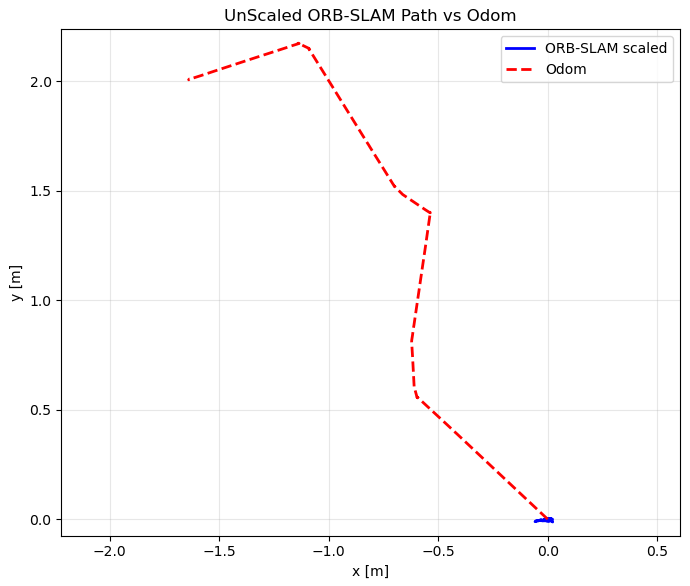
Figure 3.1.2a. Unscaled VO trajectory (raw ORB-SLAM3 output).
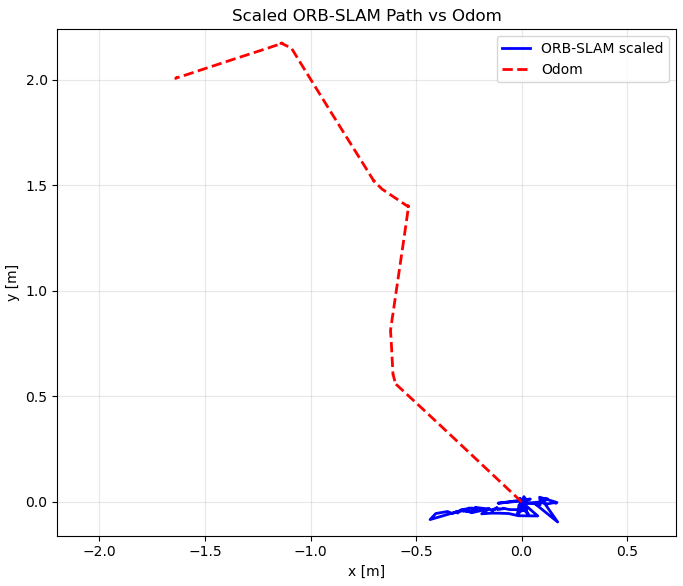
Figure 3.1.2b. Scaled VO trajectory using odometry-based scale correction.
These plots also highlight the main issue in our current pipeline: left-right camera synchronization. Because stereo frames are often not aligned in time, ORB-SLAM3 cannot reliably form matching pairs and tracking quality drops. We tested two pairing methods: (1) frame-to-frame pairing and (2) pairing by header.stamp timestamp. Both methods still show degradation when the left-right time offset becomes large.
3.2 Run-Time Issues
3.2.1 Failure Cases Observed
- Point clouds/RGBD do not get published automatically, and need specific handling of turtlebot4_bringup package, and services.
- Left-right timestamp offset (~
33 ms) -> stereo mismatch -> VO jitter. - Fast turns/vibration -> motion blur -> fewer stable ORB matches.
- Low-texture scenes -> weak feature tracking -> higher VO drift.
- VO tracking degradation -> repeated
Fail to track local mapevents and map resets. - VO/wheel odometry latency mismatch -> EKF lag or overshoot without proper time alignment.
3.2.2 Recovery / Mitigation Logic
- A dedicated development workspace was created, the turtlebot4 package was cloned, unnecessary services were disabled, the camera YAML and launch files were modified, the package was rebuilt locally, and the required services and nodes were launched.
- Pair left/right images using
header.stamp, and track mean/median/p95 pairing error each run. - Tighten sync tolerance toward
10-20 ms, then compare retained pair count vs VO stability. - Improve data collection ROS bags (in progress)
- Record ROS bags on the turtlebot to avoid losing data over network.
3.2.3 Remaining Limitations
- PointCloud generation has been the main challenge, and will be resolved in the final milestone.
- Hardware-level stereo synchronization is not finalized.
- Current bags are sufficient for analysis, but not yet for stable continuous VO in all runs.
- Final quantitative metrics (RMSE, drift per meter, yaw drift) are still pending.
- Nav2 closed-loop integration with fused localization is still pending.
4. Project Management
This section documents feedback integration and individual contributions.
4.1 Instructor Feedback Integration
| Milestone 1 Feedback / Question | Action Taken | Technical Change Implemented | Current Status |
|---|---|---|---|
| Change “Just the Docs Template” Webpage Title. | Updated the _config.yaml file | None | resolved |
| The sentence “The system will be considered successful if the following conditions are met:” should not have a bullet point. | Removed the bullet point | None | resolved |
| Khaled’s name | Removed placeholders | None | resolved |
4.2 Individual Contribution checking
| Team Member | Primary Technical Role | Key Git Commits / PRs | Specific File(s) Authorship | Notes |
|---|---|---|---|---|
Mohammad Nasr | Perception_Module | [970c915,b180cfd, 4a9a162, 03b2bf6 (For report)] | cylinder finder, box_finder, pose_estimator, orchestrator, nbv_planner, confidence_evaluator | all nodes need to be tested on real data/robot |
Vikas Narang | Localization_Module (VO + EKF) | [1 parent 3b519bc commit 61fc196 (For report)] | orb_vo_node.py, orb_vo.yaml, ekf.yaml | all nodes need to be tested on real data/robot |
Khaled | Navigation_Module | [e5e9469] | navigation subsystem design, Nav2 integration plan, action/service interface definition, safety and execution workflow documentation | Nav2 goal-dispatch and safety-monitor integration are the next implementation steps |